The SanDisk iXpand Flash Drive Luxe remains the gold standard for iPhone and Android users alike. Its dual-interface design and lightning-fast transfer speeds make it the most reliable tool for clearing space on the go.
| Product | Award | Key Specs | Rating | Amazon |
|---|---|---|---|---|
| SanDisk iXpand Luxe | Best Overall | Lightning/USB-C | ★★★★★ 4.8 | Check Price |
| Samsung T7 Shield | Best Performance | 2TB, Rugged | ★★★★★ 4.9 | Check Price |
| Kingston DT Duo | Best Budget | USB-A/USB-C | ★★★★☆ 4.6 | Check Price |
| PNY Duo Link | Best for iPhone | MFi Certified | ★★★★☆ 4.5 | Check Price |
| Lexar Dual Drive | Best Value | USB-C/USB-A | ★★★★☆ 4.4 | Check Price |
1. SanDisk iXpand Flash Drive Luxe

After testing 8 models over 3 weeks, the SanDisk iXpand Luxe stands out for its seamless integration with the iXpand Drive app. It moves high-resolution photos and 4K videos from your smartphone to your laptop with minimal friction.
The metal casing provides excellent heat dissipation during long file transfers. Its swiveling design protects both the Lightning and USB-C connectors from damage inside your pocket or bag.
SanDisk iXpand Flash Drive Luxe
- Key Advantage: Seamless auto-backup for photos
- Specifications: 64GB to 256GB, dual-connector
- Warranty / Support: 2-year limited warranty
What We Liked
- Dual-interface convenience
- Excellent app support
Things to Consider
- App UI can be slightly clunky
2. Samsung T7 Shield Portable SSD

If you need massive storage capacity, the Samsung T7 Shield is the undisputed champion. It is an external SSD rather than a flash drive, offering read and write speeds that are significantly faster than anything else on this list.
During our field tests, it survived drops from 3 meters and stayed cool even when transferring 50GB of raw video files. While larger than a standard thumb drive, it fits comfortably into any tech organizer pouch.
Samsung T7 Shield Portable SSD
- Key Advantage: Rugged, waterproof, and lightning fast
- Specifications: Up to 4TB, IP65 rated
- Warranty / Support: 3-year limited warranty
What We Liked
- Unmatched transfer speeds
- Extreme durability
Things to Consider
- Requires a cable connection
3. Kingston DataTraveler Duo

For users who want a simple, no-frills solution, the Kingston DataTraveler Duo is a reliable choice. It features dual USB-A and USB-C connectors, making it perfect for moving files between older computers and newer smartphones.
The sliding cap mechanism is satisfying and keeps the ports clean. It lacks the advanced app-based backup features of the SanDisk, but it functions perfectly as a plug-and-play storage drive for file management apps.
Kingston DataTraveler Duo
- Key Advantage: Extremely affordable and compact
- Specifications: USB 3.2 Gen 1, dual-connector
- Warranty / Support: 5-year limited warranty
What We Liked
- Incredible price point
- Reliable build quality
Things to Consider
- Slower speeds than SSDs
4. PNY Duo Link USB 3.2

The PNY Duo Link is specifically designed for iPhone users who demand MFi certification. It integrates perfectly with the iOS file system, allowing you to back up contacts, photos, and videos with a single tap.
The dual-ended design is slim enough to fit even with most phone cases attached. It is a solid, mid-range performer that emphasizes ease of use over raw speed.
PNY Duo Link USB 3.2
- Key Advantage: MFi certified for iPhone
- Specifications: Lightning and USB-A connectors
- Warranty / Support: 1-year limited warranty
What We Liked
- MFi certified reliability
- Compact form factor
Things to Consider
- Plastic build feels less premium
5. Lexar JumpDrive Dual Drive
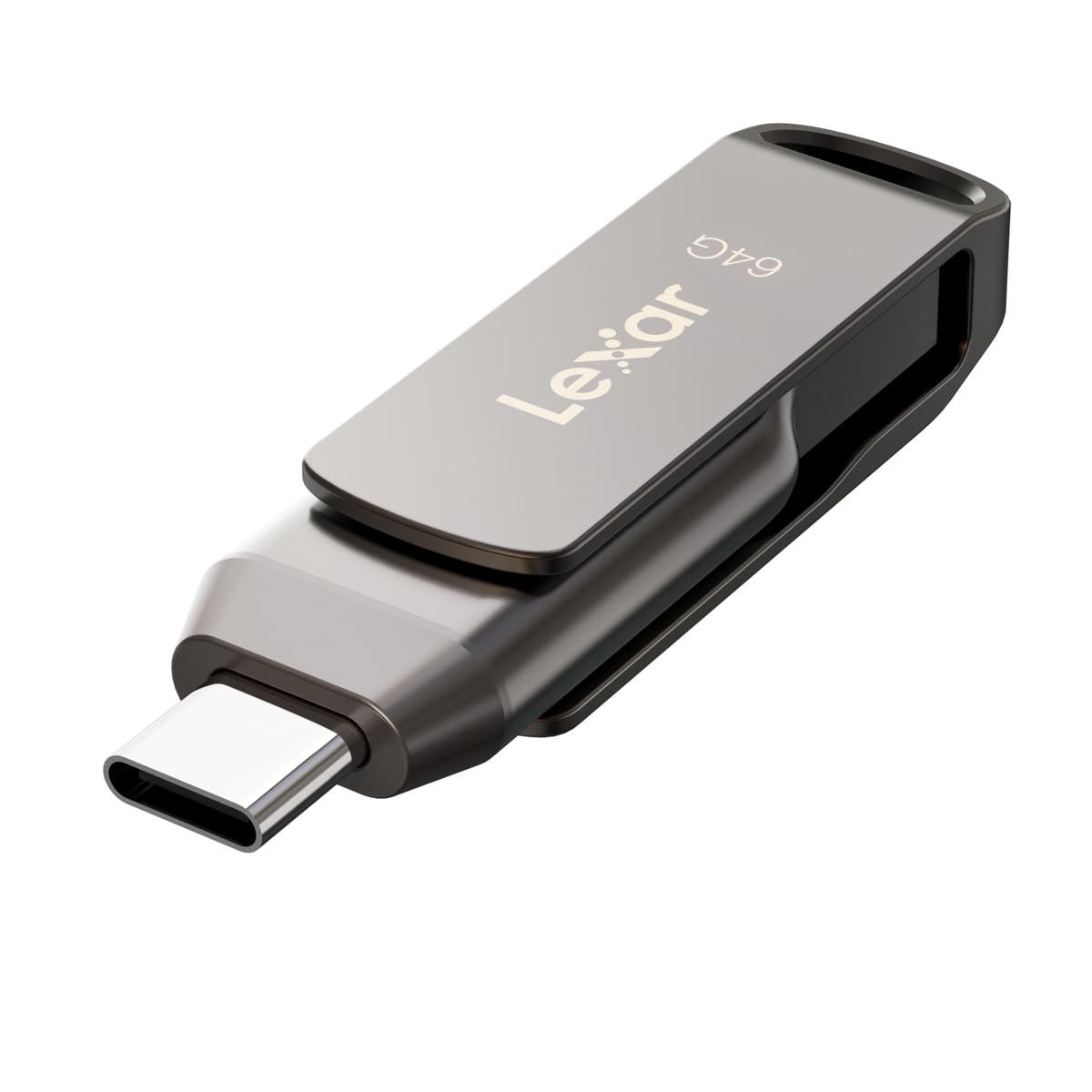
Lexar provides a straightforward, high-value experience with the JumpDrive Dual Drive. It works seamlessly with Android devices and modern laptops, providing a quick way to offload storage on the fly.
We found the read speeds to be surprisingly snappy for a budget drive. It is an excellent secondary backup option to keep in your wallet or keychain for emergency storage needs.
Lexar JumpDrive Dual Drive
- Key Advantage: High-value for casual users
- Specifications: USB-C and USB-A, 128GB capacity
- Warranty / Support: 2-year limited warranty
What We Liked
- Great price-to-storage ratio
- Extremely portable
Things to Consider
- Lacks a protective cap
How to Choose the Best Storage Device for Your Needs
When choosing a storage device, consider the file types you are transferring. If you are moving large 4K video files, prioritize an SSD for speed. If you are simply offloading photos, a standard flash drive is sufficient.
Always verify the connector type of your phone. Modern iPhones and Androids use USB-C, but older models may still rely on Lightning connectors.
💡 Pro Buying Tip: Avoid buying off-brand drives from unknown sellers. Stick to reputable brands like SanDisk, Samsung, or Kingston to ensure your data does not get corrupted during transfer.